
25 Faceless TikTok Ideas for App Developers (No Camera, No Voiceover)
25 faceless TikTok slideshow ideas sorted by what you already have: screenshots, a study, user reviews, words or your build story. Each with a hook.
By the SlideBase team · November 4, 2026 · 9 min read
The easiest faceless TikTok ideas for an app are photo slideshows built from things you already have: your app’s screenshots, your users’ reviews, a study related to your category, your changelog, and the questions people ask you. Below are 25 ideas sorted by which of those assets each one needs, with a slide plan and a sample hook for every idea. None of them needs a camera, a voiceover or your face. We make SlideBase, which turns an App Store or Google Play link into slideshows like these, but every idea here works with a free design tool too.
Why sort ideas by what you already have
Most idea lists are sorted by topic. That is useful when you have a content team. When you are one person with an app, the real constraint is material: what can you put on six slides today without researching for an hour? So this list starts from the asset. Pick the group you have the most of, and you have a week of posts.
If you want ideas by app category instead, we already wrote 45 TikTok content ideas for apps. This list is the complement: formats that work in any category, all faceless.
What “faceless” covers on TikTok
A faceless account never shows the person behind it. The common formats are photo slideshows, screen recordings of the app with text on top, hands-only clips, and stock or AI footage with captions. We focus on slideshows here because they are the cheapest to make every day and need no editing timeline. If you are weighing slideshows against video in general, our slideshow vs video comparison covers the tradeoff, and faceless app marketing explains the broader approach.
If you have screenshots of your app (ideas 1 to 5)
- The “one screen that fixed it” post. Four slides of the problem, one slide with a single cropped screenshot that solves it, one slide with the app name. Hook: “I checked my bank app every morning and still overspent. This screen stopped it.”
- The hidden feature reveal. Slide 1 asks whether the viewer knew X was possible; slides 2 to 5 walk through the steps with screenshots; slide 6 names the app. Hook: “Your phone can tell you which habit you’re about to quit. Most people never turn this on.”
- Before and after the app, as screenshots. A messy notes app vs your app’s clean view; a 40-tab browser vs one list. Hook: “My meal planning, before and after.”
- The 30-second routine. Each slide is one tap in your app, with what it does for the user’s day. Hook: “The 30-second evening routine that makes my mornings easier.”
- “What the app sees.” For AI or scanning apps: the input photo, then what the app extracted from it, slide by slide. Hook: “I took one photo of my lunch. Here’s everything it told me.”
If you have a study or a statistic (ideas 6 to 10)
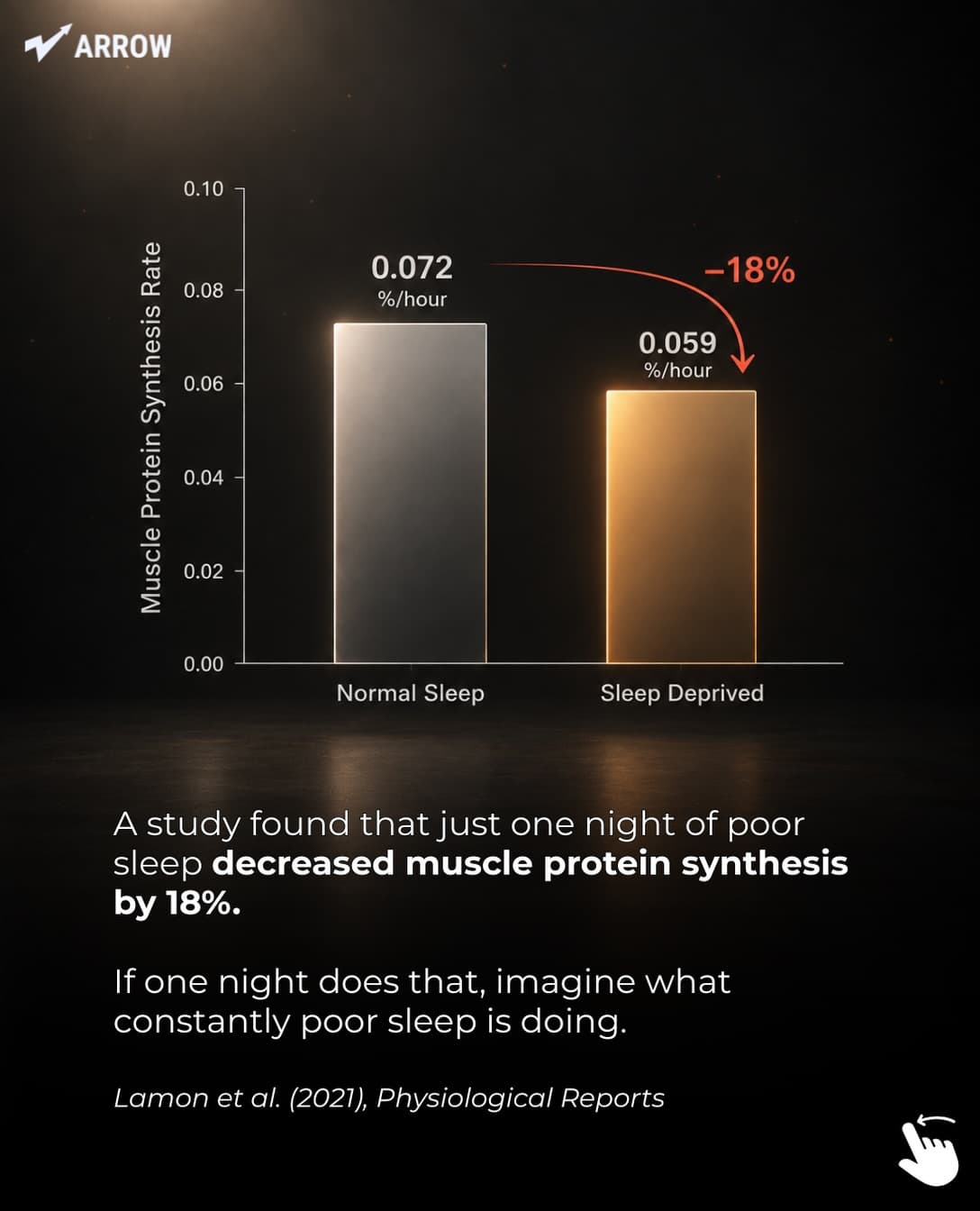
- The single surprising number. Slide 1 is the number, slides 2 to 4 explain it, slide 5 says what to do, the last slide is the app. Always cite the source on a slide. Hook: “One night of bad sleep can cut muscle growth by up to 18%.”
- The chart slide. Turn a finding into a simple two-bar chart. Viewers save charts. Hook: “What happens to your testosterone after one bad night.”
- Myth vs research. Three popular beliefs in your category, each with what the evidence says. Hook: “3 things everyone believes about carbs. The research disagrees with 2.”
- The “why this happens” explainer. One mechanism explained in plain language. Hook: “Why you always wake up at 4am.”
- The cost of not doing it. Translate a habit into money, time or health over a year. Hook: “I added up the subscriptions I forgot about. It came to more than a weekend away.” If you quote an average instead of your own number, source it.
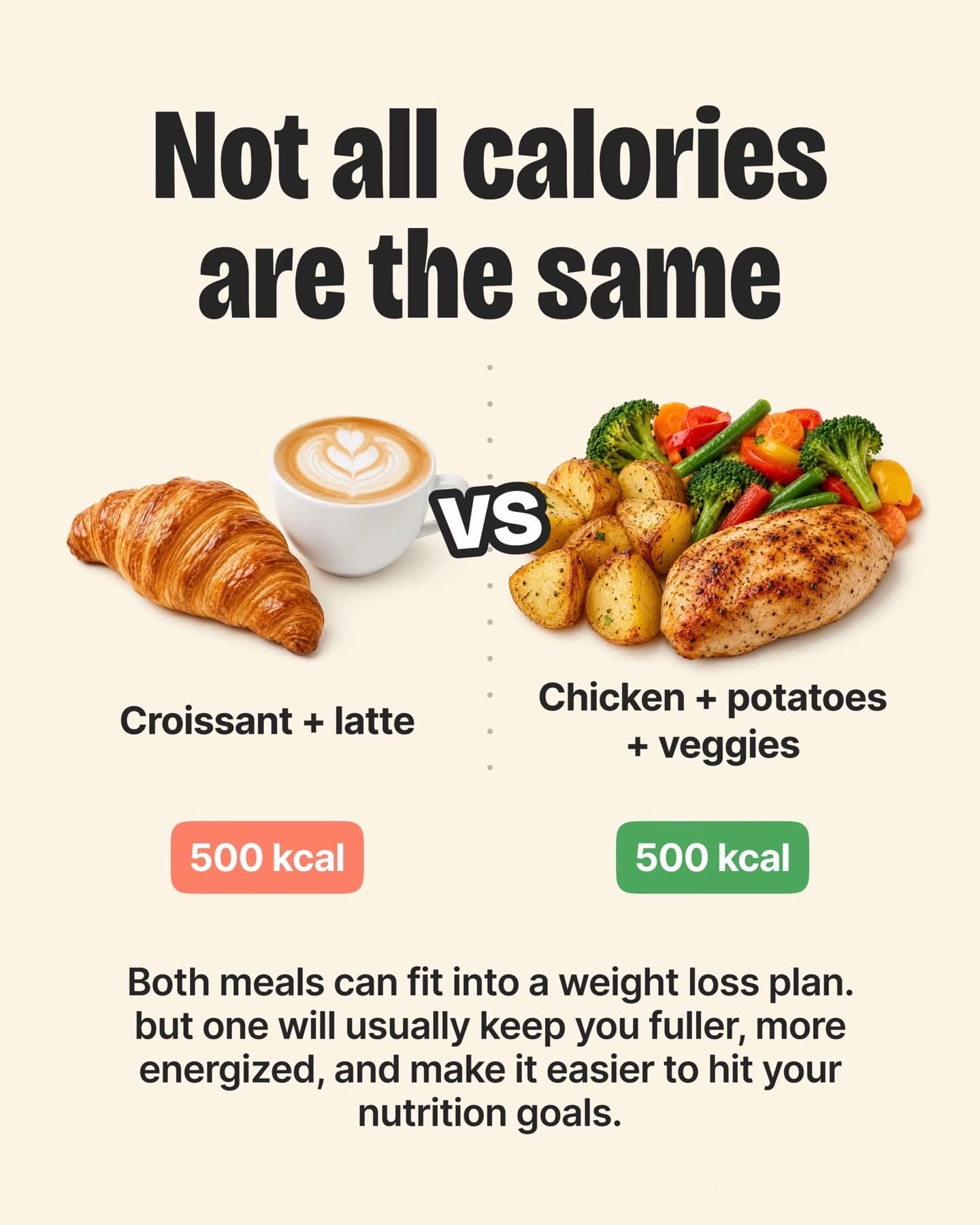
Here is what the data format looks like in a deck SlideBase made for a strength-training app called Arrow, next to a comparison slide from a nutrition deck:
If you have user reviews or messages (ideas 11 to 15)
- The review that made your week. Screenshot one real App Store review (name blurred), then two slides on the problem the user had, then the app. Hook: “Someone left this review at 2am and I haven’t stopped thinking about it.”
- “You asked, we built it.” A user request, the reasoning, the result in a screenshot. This works well as a changelog post. Hook: “212 of you asked for dark mode. Here’s why it took 3 months.”
- The most common question, answered. Take the question you get most by email and answer it in five slides. Hook: “Does this work offline? Everyone asks. Here’s the honest answer.”
- The complaint you agree with. Show a fair criticism and what you changed. Building in public without a face. Hook: “A user called our onboarding ‘homework’. They were right.”
- Use cases you never expected. Three ways real users use your app that you did not design for. Hook: “I built a habit tracker. People are using it to track their dog’s medicine.”
Only use real reviews and real numbers. Inventing a testimonial is the fastest way to get called out in the comments, and it breaks both platforms’ rules.
If you only have words (ideas 16 to 20)
- The side-by-side comparison. Two options with the same cost and different results. Hook: “Same 500 calories. One keeps you full until dinner.”
- The numbered list of hard-won lessons. One lesson per slide, the last lesson leads to the app. Hook: “8 things every golfer learns the hard way.”
- The “explained for normal people” post. Take the jargon in your category and decode it. Hook: “What the hell are macros? Explained for normal people.”
- The confession. A first-person story in six slides, written as text. No face needed for a personal story. Hook: “I quit every habit on day 11. Here’s what finally stuck.”
- The checklist. A save-worthy list the viewer will come back to. Hook: “5 things to check before starting a new skincare routine.”
If you have your own build story (ideas 21 to 25)
- Why you built it. The personal problem, told in five slides of text and one screenshot. Hook: “I kept forgetting my girlfriend’s coffee order, so I built an app.”
- The feature you deleted. What you removed and why the app got better. Developers and users both find this interesting. Hook: “We deleted our most-requested feature. Here’s what happened.”
- Your app vs the famous one. An honest comparison with the category leader, including where they win. Hook: “Duolingo vs 40 spoken sentences. I tried both before a trip.”
- Milestones as slides. Downloads, reviews, the first paying user, told as a timeline. Keep it real; viewers can tell. Hook: “Month 1 of my app: 14 downloads. Month 6: here’s what changed.”
- The roadmap vote. Three possible next features, each on a slide, asking viewers to comment. Comments are a strong signal and give you research for free. Hook: “I can build one of these next. You pick.”
How to turn one idea into a week of posts
The trick that makes faceless accounts sustainable is variation, not invention. Take one idea that worked and change one thing per post:
| Day | What changes | Example (idea 16, comparison) |
|---|---|---|
| Mon | Original | Croissant vs chicken and potatoes, both 500 kcal |
| Tue | New pair, same format | Smoothie bowl vs eggs on toast |
| Wed | Different hook type | Question: “Which one keeps you full longer?” |
| Thu | Different audience | Same idea for gym-goers: pre-workout snacks |
| Fri | Longer deck | Five pairs instead of one |
| Sat | Reverse it | “Same food, 3 different calorie counts” (portion sizes) |
| Sun | Repost the best one on Instagram | As a 4:5 carousel |
Seven posts, one idea, no new research. This is also how you find out which variable matters, because only one changes at a time. Our slideshow strategy guide explains how app accounts scale this to more than one post a day.
Rules that keep faceless posts from reading as ads
- The app appears once, near the end. Ideas 1 to 25 all follow this. The viewer should get value even if they never install.
- Real photos beat stock-looking graphics. A real bedroom, a real lunch, a real golf course. The account feels like a person even without a face.
- Write in first person when it is your story. “I” and “we” make faceless accounts feel human.
- Hooks do the heavy lifting. Without a face to stop the scroll, slide 1 has to. Our hook library for apps has dozens by category.
- Captions finish the job. Repeat the hook with a search term and name the app. See 30 caption templates for app slideshows.
Making 25 ideas into 25 posts
Writing and laying out a deck by hand takes 30 to 45 minutes. At one a day, the ideas run out of you before they run out of the list. SlideBase is built for that part: paste your App Store, Google Play or website link and it reads the listing and screenshots, writes the hook and slide text for a fresh angle, lays out six to eight slides in your brand colours with a caption and five hashtags, and lets you edit before you download or post. TikTok and Instagram posting goes through their official APIs, so no passwords. Credits are spent per slide (a six-slide post is about six credits) and unused credits roll over. Starter is $29 a month; Pro and Ultra add a 3-day trial. See the slideshow generator and plans, or paste your link and get your first decks.
FAQ
Can a faceless TikTok account actually get app downloads?
Yes. TikTok distributes posts by interest rather than by who made them, so an account with no face and no followers can still reach the right viewers. Consumer apps such as Cal AI and Umax grew heavily through TikTok slideshows and creator posts (those teams are not SlideBase customers). Downloads still depend on the hook and on posting consistently.
What are the easiest faceless TikTok ideas for beginners?
Comparisons, numbered lists and “explained for normal people” posts. They need only words and a few photos, they work in almost every category, and they are easy to vary day to day. Start there before trying data or review posts.
Do faceless TikToks need a voiceover?
No. Photo slideshows carry their message in the text on each slide, with a background sound. A voiceover is optional for faceless video and unnecessary for slideshows.
How often should a faceless app account post?
One post a day is a sustainable floor for a solo developer. Give it about 30 posts before judging results, since single posts vary a lot. The variation table above is the easiest way to keep up without running out of ideas.
Is it allowed to use AI images in faceless TikToks?
TikTok allows AI-generated content but asks creators to label realistic AI images and video. For app slideshows, real photos and your own screenshots usually read as more trustworthy anyway, and they avoid any labelling questions.