
App Launch Marketing Plan: 30 Days of TikTok and Instagram Slideshows
A day-by-day app launch plan for solo developers: pre-launch checklist, 30-day slideshow calendar, launch-day schedule and how to read results.
By the SlideBase team · November 4, 2026 · 10 min read
A good app launch marketing plan for a solo developer is 30 days of daily TikTok and Instagram photo slideshows that start two weeks before release, plus a store page that is ready before the first post goes out. Launch day itself matters less than people think; the posts you make in the four weeks around it decide whether anyone finds the app. You can write and lay out those slideshows by hand, or use a tool like SlideBase, which turns your App Store, Google Play or website link into ready-to-post slides, as one way to keep the daily pace.
This guide is the plan itself: what to finish before launch, a day-by-day calendar for the 30 days, what each post should say, and how to tell at the end whether it worked. It assumes you have no audience, no ad budget and about an hour a day.
Why a launch is a 30-day thing, not a day
Most first launches follow the same arc. The developer spends months building, posts once on Product Hunt, Reddit and X on release day, gets a spike of 40 to 200 installs from friends and other makers, and then watches downloads fall to near zero within a week. Nothing was wrong with the app. The launch was a single event, and single events do not compound.
TikTok and Instagram work the other way round. Each post is a fresh lottery ticket shown to strangers, and the account gets better at picking topics with every post you make. A month of daily posts gives you around 30 tickets and enough data to see what your audience responds to. That is why we treat the launch as a month-long window with release day in the middle of it. Our guide to promoting an app on TikTok explains the distribution mechanics in more depth; this article is the calendar.
Pre-launch checklist: what to finish before day 1
Do these before you post anything. Every one of them is a leak in the path from “saw a post” to “installed the app”.
- Store page with a real first screenshot. The first two screenshots carry most of the conversion. Make the first one an outcome (“Know your macros from one photo”), not your login screen. If you are pre-release on iOS, set up a pre-order page; on Google Play, pre-registration does the same job.
- Basic ASO. Title, subtitle and keyword field filled with the words your users would actually search. You do not need a paid tool for a first pass; our ASO vs TikTok comparison covers how much time to give this.
- A TikTok Business account and an Instagram Business or Creator account, both named after the app, with the app icon as the profile photo and the store link in the bio.
- A tracking link. An App Store custom product page URL or a UTM-tagged Google Play link in each bio, so you can count installs that came from social at the end of the month.
- Ten hooks written in advance. First slides, one sentence each, aimed at one specific person. If you struggle to write ten, read our hook formulas for app slideshows first.
- A spreadsheet with columns for date, platform, hook, angle, views at 48 hours, profile visits and saves. You will thank yourself on day 30.
The 30-day calendar
The plan below assumes release on day 15. Shift it if your date moves; keep the order. One slideshow a day on TikTok, and the same slides reposted to Instagram as a carousel, which costs you nothing extra.
| Days | Phase | What to post | Goal |
|---|---|---|---|
| 1–7 | Problem week | Pure problem posts. No app at all, or only a soft mention on the last slide. Myths, mistakes, “things nobody tells you about…” | Find out which problem framing gets watched and saved |
| 8–14 | Build-up | Problem posts that end with “I built something for this, out on the 15th”. One behind-the-build post (a screenshot before and after). | Followers and pre-orders or pre-registrations |
| 15 | Launch day | Your best-performing hook from week one, rewritten with the app on slides 6 and 7. Also post on Product Hunt, Reddit and X. | The install spike |
| 16–22 | Proof week | Payoff posts: what using the app looks like, early user feedback you actually received, comparisons to the obvious alternative | Installs from people who did not know you |
| 23–30 | Double down | Five to six variations of your top two posts: same angle, new hook, new example | Confirm the winning angle so month two is a repeat, not a guess |
Notice that the app barely appears in the first week. That is deliberate. Posts that open as an ad get swiped. Posts that make a stranger feel understood get watched to the end, and the app slide lands better when it arrives after five slides of agreement.
What a launch-month slideshow looks like
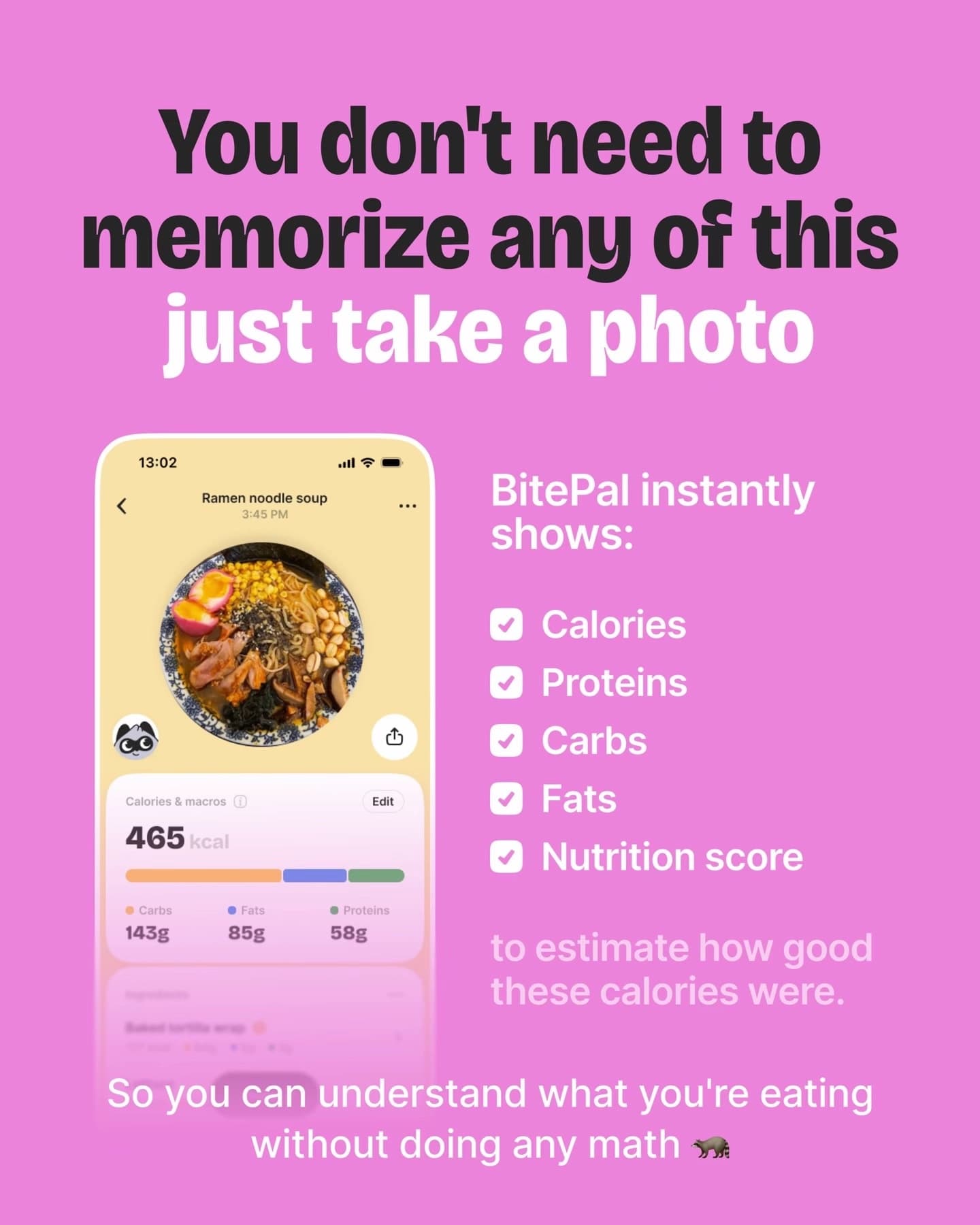
Here are two slides from a 10-slide deck SlideBase generated for a calorie and macro tracker called BitePal. It is a problem-week style post: nine slides teach something useful, and only the last one shows the app.
Day by day: the first week in detail
Week one sets up everything else, so here it is post by post for a hypothetical sleep-tracking app. Swap in your own category; keep the angles.
- Day 1 (mistake): “5 things you do before bed that wreck your sleep”
- Day 2 (myth): “8 hours of sleep is not the number that matters”
- Day 3 (relatable): “POV: you went to bed at 11 and you are still awake at 1:40”
- Day 4 (numbers): “What one bad night does to your next day, in numbers”
- Day 5 (comparison): “Sleep trackers vs a notebook: what each actually tells you”
- Day 6 (checklist): “A 10-minute wind-down that worked for me”
- Day 7 (question): “Why do you wake up at 3am? The 4 usual reasons”
On day 8, look at the spreadsheet. If the myth and numbers posts got double the views of the relatable one, week two leans on myths and numbers. If nothing stood out, that is normal after seven posts; keep the mix and decide on day 14. For more angle ideas per category, see TikTok content ideas for apps.
Launch day without the usual panic
Launch day is the one day you should post on more than TikTok and Instagram, because the free launch platforms reward a single coordinated moment. A realistic schedule for one person:
- Morning: release the app, check the store page loads in two countries, test the bio links from a phone that is not yours.
- Mid-morning: post the launch slideshow on TikTok and the same slides as an Instagram carousel. Do not change the hook style that worked in week one just because it is launch day.
- Midday: Product Hunt, a build-story post in a relevant subreddit (read the rules first), and a short thread on X. Link to the store, not your website.
- Evening: reply to every comment on every platform. Comments on day one are the cheapest distribution you will ever get.
Then go to sleep, and post your normal slideshow on day 16. The biggest launch-month mistake is treating day 15 as the finish line.
The Instagram half of the plan
Instagram carousels and TikTok photo posts are the same asset in two sizes. TikTok shows a 9:16 frame; Instagram feed carousels look best at 4:5. If you lay out slides once at 4:5 with text kept away from the edges, both platforms work. The audiences overlap less than you would expect, and Instagram tends to reward saves, so checklists and how-to posts usually do better there than pure relatable posts. Our guide to promoting your app on Instagram covers the account setup, and the Instagram carousel generator page shows how SlideBase handles both sizes.
What the month costs in time and money
There is no ad spend in this plan. The cost is your time, and it is worth being honest about how much.
| Way of producing posts | Time per day | Money | Main risk |
|---|---|---|---|
| By hand (notes app plus a design tool) | 45 to 90 minutes | Free to a design-tool subscription | Skipping days in week three |
| Templates you made once, text written daily | 20 to 40 minutes | Free | Every post starts to look the same |
| A generator such as SlideBase | 5 to 15 minutes to review and edit | From $29 a month | Posting without reading what was generated |
For the generator route, the maths is simple. SlideBase spends credits per slide, so a 7-slide post uses about 7 credits, and 30 of them use about 210. The Starter plan includes 200 credits a month, which is just short of a full daily month at 7 slides, or enough at 6 slides. Unused credits roll over. If you also want a second account or two posts a day, look at Pro or Ultra on the plans page; those two come with a 3-day trial, while Starter starts paid. A scheduler matters more than people expect in launch month, because the days you are busiest fixing launch bugs are the days you forget to post; the TikTok slideshow scheduler page explains how posting through the official TikTok and Instagram APIs works.
Day 30: how to read the results
At the end of the month you will have about 30 posts per platform and a spreadsheet. Ask three questions, in this order.
- Did any post break out? One post with 10 times your median views is the most useful thing a launch month can produce, because it tells you the angle. Write down its hook, its topic and its slide count.
- Did installs move on good days? Compare first-time downloads on the two days after your best posts with your quiet days. Include App Store search installs, because many viewers search the app name instead of tapping the bio link.
- Which angle won? Group the posts by angle (myth, mistake, relatable, numbers, comparison) and compare median views per group. Median, not average; one breakout distorts an average.
If one angle clearly wins, month two is 30 more posts on that angle with new hooks. If nothing stands out, do not conclude the channel failed. Thirty posts is the minimum sample, not a verdict. Our guide to posting frequency covers when to add a second post per day or a second account, and how to get your first 1,000 downloads without ads picks up where this month ends.
Common launch-month mistakes
- Starting to post on launch day. You lose the two weeks where the account learns what works, and the launch post goes out from an account with zero history.
- Making every post about the app. Feature tours get swiped. Problem posts get watched.
- Changing five things at once. If you change the hook style, the topic and the slide count in the same week, you cannot tell which one mattered.
- Deleting posts that flopped. Slideshows often pick up views on day two or three. Leave them.
- Stopping on day 31. The plan is a template for every month after, not a one-off campaign.
If you want a broader view of where TikTok sits next to Reddit, ASO and launch platforms, read the indie app marketing guide, or the overview of TikTok marketing for apps. And if the daily production is the part you dread, you can paste your store link into SlideBase and see the first batch of slides before you decide anything.
FAQ
How long before launch should I start marketing my app?
Two weeks of daily posting before release is a practical minimum. It gives the account history, lets you test which problem framing your audience responds to, and means your launch-day post uses a hook you already know works. Starting earlier is fine if you can keep posting daily the whole time.
What should I do before launching an app?
Finish the store page (with an outcome-focused first screenshot), fill in basic ASO metadata, set up TikTok and Instagram business accounts with the store link in the bio, create a trackable link, and write ten hooks. Do this before your first post so no early viewer lands on a half-finished page.
Do I need ads for an app launch?
No. This plan uses no ad spend. Paid boosts make sense later, once a post has already performed well organically, because then you are paying to extend something proven rather than to find out whether it works.
Should I post the same slideshow on TikTok and Instagram?
Yes, for most solo developers. The audiences overlap less than you would think, and reposting doubles your reach for no extra writing. Lay the slides out at 4:5 with text away from the edges so they read well in both apps.
What if nothing goes viral in the first 30 days?
That is the common outcome and it is not a failure. Use the spreadsheet to find the angle with the best median views and run another month on it. Most accounts that eventually work found their angle somewhere between post 30 and post 90.